<cfscript>
selectedList = "1,2,6";
currentList  ="1,2,3,4,5";
selectedArray = ListToArray(selectedList);
currentArray = ListToArray(currentList);
deleteArray = currentArray.clone();
deleteArray.RemoveAll(selectedArray);
insertArray = selectedArray.clone();
insertArray.RemoveAll(currentArray);
WriteOutput("selected");
WriteDump(selectedArray);
WriteOutput("Current");
WRiteDump(currentArray);
WRiteOutput("Deleted");
WriteDump(deleteArray.ToList());
WriteOutPut("Inserted");
WriteDump(insertArray.ToList());
</cfscript>

A personal blog of Christopher Wigginton; a nerd by nature, programming polyglot, cooking enthusiast and fermentation practitioner.
Showing posts with label ColdFusion. Show all posts
Showing posts with label ColdFusion. Show all posts
Friday, November 17, 2023
ColdFusion: Comparing a selected list vs an existing list and determining which needs to be inserted and deleted.
I've seen implementations in code, where in a database update all the records are deleted and new ones are inserted. Here's a simple method in ColdFusion using underlying Java array methods for determining from a given selection list and current list, which items need to be deleted and inserted.

Wednesday, August 24, 2022

Wednesday, May 11, 2022
openCSV in ColdFusion and Lucee
The opencsv project at http://opencsv.sourceforge.net/ is a nice overall java based csv parser library that can automatically support qualified strings that contain comma's. The below code works in ColdFusion 2021 as is with the opencsv.jar file but needs an additional jar with Lucee 5.3.9.
ColdFusion and Lucee:
Grab the source from opencsv.sourceforge.net and run mvn to produce the jar. I used version 5.6.
Lucee:
Download the apache commons lang3 source from https://commons.apache.org/proper/commons-lang/download_lang.cgi and compile with maven.
| opencsv-5.6.1-SNAPSHOT.jar |
| commons-lang3-3.12.0.jar |
Put the jar(s) in the lib folder of the server or use a jar loader. start up the server and run the following test (adjust the path to your sample csv data file). which should produce the data below (excluding the other dumps)
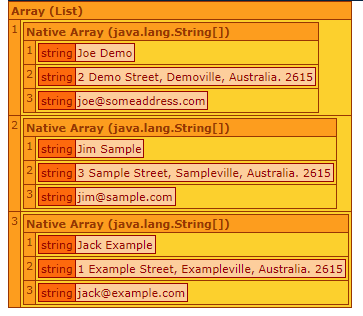
<cfscript>

    csvFile ="#expandPath('.')#/csv_data/addresses.csv";
    csvData = [];

    fileReader = createobject("java","java.io.FileReader").init(csvFile);

    writeDump(fileReader);

    csvReader = createObject("java","com.opencsv.CSVReader").init(fileReader);
    writeDump(csvReader);
    csvData = csvReader.readAll();
    writeDump(csvData);

    csvReader.close();

</cfscript>
Thursday, March 5, 2020
Why Lucee is Better Than ColdFusion #1
Lucee's Query of Queries is better than Adobe. Try this little snippet on Lucee 5 and then CF2018 or earlier

<cfscript>
       myQuery=QueryNew("Country,Capital City,Amount##","varchar,varchar,numeric");
       /*Add array values in column*/
       myAreaValues=ArrayNew(1);
       myAreaValues[1]=100000;
       myAreaValues[2]=50000;
       myQuery.addColumn("Area","integer",myAreaValues);
       WriteDump(myQuery);
</cfscript>
Thursday, August 15, 2019
ColdFusion: Pretty Printing JSON with Google's gson
Here's a simple example on how to pretty print JSON with ColdFusion.
Install or load Google's gson.jar file by building it from the git repo https://github.com/google/gson or download the latest jar
Install or load Google's gson.jar file by building it from the git repo https://github.com/google/gson or download the latest jar
<cfscript>
variables.myJSON = {"ugly":"put in some ugly/compressed json here"};
variables.objJSON = CreateObject("java","com.google.gson.GsonBuilder").setPrettyPrinting().create();
variables.objParser= CreateObject("java","com.google.gson.JsonParser");
variables.jsonElement =  variables.objParser.parse(variables.myJSON);
variables.result = variables.objJSON.toJson(variables.jsonElement);
WriteOutput("<textarea cols='80' rows='20'>#variables.result#</textarea>");
</cfscript>
Tuesday, May 21, 2019
RegEx: Searching for CFQUERY tags that are not Query of Queries
I recently had to search several thousand files for ColdFusion <CFQUERY> tags that were hitting a database and not the dbtype="query". The following regex pattern in Sublime will do the trick
^(?!.*dbtype.*)(<cfquery .*>)
Friday, April 5, 2019
How to Make an Ugly Excel Document: Otherwise known as Unit Testing POIUtility 4.0 (Apache POI 4.0.1) compatible
I've been working on a revamp of Ben Nadel's excellent but aging POIUtility for the generation of Excel files. I've been needing XLSX support so I updated the code to use Apache POI 4.0.1 and embedded Mark Mandel's JavaLoader and the needed packages for it to work standalone without java lib dependencies on the server.
Here's a summary of what I've done so far;
- Uses Apache POI 4.0.1 with JavaLoader
- Supports creation of both XLS and XLSX
- RowSpan support. Either by itself or with colSpan to create a range (see ugly image below)
- poi:row update attribute when working with existing templates.
- refactored the CSSRule.cfc into cfscript,
TODO: Work on updating the POIUtility.cfc now that the groundwork is complete.
I did yank the coldfusion_mx_7 folder, figured it's about time for people to move ahead on that one.
Tested on CommandBox with ColdFusion 2018
Go to my repo or the code https://github.com/wiggick/POIUtility.cfc
Go to my repo or the code https://github.com/wiggick/POIUtility.cfc
Color, fill pattern, and region test. (note text colors are just random selection )

Wednesday, February 20, 2019
ColdFusion POI:Row and updating
I was working with the POI custom tags from Ben Nadel and noticed that the tag was creating the rows rather than updating.
Adding a get and check fixed the issue.
<!--- Try Getting the  row. --->
  <cfset VARIABLES.Row = VARIABLES.SheetTag.Sheet.getRow( JavaCast( "int", (VARIABLES.SheetTag.RowIndex - 1) ) )>

  <cfif ! StructKeyExists(VARIABLES, "Row")>
  <cfset VARIABLES.Row = VARIABLES.SheetTag.Sheet.CreateRow(
   JavaCast( "int", (VARIABLES.SheetTag.RowIndex - 1) )
   ) />
  </cfif>
Monday, April 11, 2016
Example of a ColdFusion web service for AngularJS using $http and JSONP
A small example of a ColdFusion JSONP Web service using $http, that expands on Ben Nadel's excellent article on Using JSONP With $resource In AngularJS.
Form Submit Code for the AngularJS Controller
$scope.onSubmit = function(){
      $http(
        {
          method: 'JSONP',
          url: 'http://your_site/your_cf_jsonp_service.cfm',
          params: {
            callback: "JSON_CALLBACK",
            data: $scope.formModel
          }
        }
      ).then(
        function successCallBack(response){console.log("returned");console.log(response);},
        function errorCallBack(response){console.log("error"); console.log(response);}
      );
  };
Sample ColdFusion AngularJS JSONP Service
<cfsetting showDebugOutput="No">
<!--- Configure the Access Control header for your environment --->
<cfheader name="Access-Control-Allow-Origin" value="*">

<cfparam name="url.callback" type="string" default="angular.callbacks_0">
<!--- Do processing logic, create objects, etc.
then serialize it
Just going to send back a time stamp for this example --->
<cfset result = Now()>
<cfset response= "#url.callback#(#serializeJson(result)#)">
<cfcontent type="text/javascript; charset=utf-8" variable="#charsetDecode(response,'utf-8')#" />
Subscribe to:
Posts (Atom)