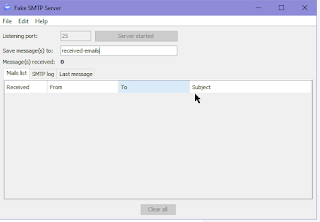
In the example below I'm using fakeSMTP , an smtp server emulator I've mentioned in a previous post.




A personal blog of Christopher Wigginton; a nerd by nature, programming polyglot, cooking enthusiast and fermentation practitioner.
A couple of handy IIS Dumps of sites and virtual directories.
Sites
Import-Module Webadministration
Get-ChildItem -Path IIS:\Sites > d:\allsites.txt
Virtual Directories
$SiteVirtualDirectories = @()
$Sites = gci IIS:\Sites
foreach($Site in $Sites)
    {
    $VirtualDirectories = gci "IIS:\Sites\$($Site.Name)" | ?{$_.NodeType -match "virtualDirectory"}
    foreach($VirtualDirectory in $VirtualDirectories)
        {
        $SiteVirtualDirectories += @([pscustomobject]@{Site=$Site.Name;VirtualDirectory=$VirtualDirectory.Name;PhysicalPath=$VirtualDirectory.PhysicalPath})
        }
    }

Out-File -FilePath D:\VirtualDirectories.txt -InputObject $SiteVirtualDirectories -Encoding ASCII
A udf for obtaining common list elements courtesy of https://www.isummation.com/blog/list-common-and-list-compare-in-coldfusion/
<cffunction name="listCommon" output="false" returnType="string">
	<cfargument name="list1" type="string" required="true" />
	<cfargument name="list2" type="string" required="true" />

	<cfset var list1Array = ListToArray(arguments.List1) />
	<cfset var list2Array = ListToArray(arguments.List2) />

	<cfset list1Array.retainAll(list2Array) />

	<!— Return in list format —>
	<cfreturn ArrayToList(list1Array) />
</cffunction>
<cfscript>
selectedList = "1,2,6";
currentList  ="1,2,3,4,5";
selectedArray = ListToArray(selectedList);
currentArray = ListToArray(currentList);
deleteArray = currentArray.clone();
deleteArray.RemoveAll(selectedArray);
insertArray = selectedArray.clone();
insertArray.RemoveAll(currentArray);
WriteOutput("selected");
WriteDump(selectedArray);
WriteOutput("Current");
WRiteDump(currentArray);
WRiteOutput("Deleted");
WriteDump(deleteArray.ToList());
WriteOutPut("Inserted");
WriteDump(insertArray.ToList());
</cfscript>
A simple custom report function for Crystal Reports that will take a numeric value and generate a string of UTF8 superscripts of the digits.
//font must be Arial Unicode MS or other font with Unicode support
//1 2 3 4 5 6 7 8 9 0
//Hex
// 2071 00B2 00B3 2074 2075 2076 2077 2078 2079 2070
//Dec
// 0185 0178 0179 8308 8309 8310 8311 8312 8313 8304
Function (numberVar SuperScriptNumber)
//If 1 thru 9 and then zero since we're not a zero based array
Local NumberVar Array subs := [0185,0178,0179,8308,8309,8310,8311,8312,8313,8304];
Local NumberVar x;
Local NumberVar DecValue;
Local StringVar NumString := ToText(SuperScriptNumber,0,"","");
Local StringVar SuperString := "";
For x:= 1 to Len(NumString) Do
(
	DecValue:= ToNumber(Mid(NumString,x,1));
	if DecValue = 0 then SuperString := SuperString + chrw(subs[10])
	else
	SuperString := SuperString + chrw(subs[decValue]);
);
SuperString
After trying to play around with the open package which is a dependency of react-dev-utils, I added the bopen package and changed the open call on line 131 in openBrowser.js to bopen and added incognito:true
This is currently hack status. but does solve the issue of using my chrome with all my extensions and launching the dev server in incognito mode.
  try {
    var options = { app: browser, wait: false, url: true , incognito: true};
    bopen(url, options).catch(() => {}); // Prevent `unhandledRejection` error.

    return true;
  } catch (err) {
    return false;
  }



This VBA Macro for Outlook will take a selected emails and save it to c:\Temp folder as PDF's
'Outlook Macro for taking selected emails and exporting them to a folder as PDF's.
'Assumes you have Word installed and are an Exchange user.

Function CleanFileName(strText As String) As String
  Dim strStripChars As String
  Dim intLen As Integer
  Dim i As Integer
  strStripChars = "/\[]:=," & Chr(34)
  intLen = Len(strStripChars)
  strText = Trim(strText)
  For i = 1 To intLen
    strText = Replace(strText, Mid(strStripChars, i, 1), "")
  Next
  CleanFileName = strText
End Function

Sub SaveSelectedMailAsPDFFile()
  Const OLTXT = 0
  Dim currentExplorer As Explorer
  Dim Selection As Selection
  Dim oMail As Outlook.MailItem
  Dim obj As Object
  Dim sPath As String
  Dim dtDate As Date
  Dim sName As String

  Set currentExplorer = Application.ActiveExplorer
    Set Selection = currentExplorer.Selection

  For Each obj In Selection
    Set oMail = obj
    SaveAsPDF oMail
  Next
  MsgBox "Selected Emails saved as PDF to C:\Temp folder"
End Sub

Function ResolveDisplayNameToSMTP(sFromName)
  Dim oRecip As Outlook.Recipient
  Dim oEU As Outlook.ExchangeUser
  Dim oEDL As Outlook.ExchangeDistributionList

  Set oRecip = Application.Session.CreateRecipient(sFromName)
  oRecip.Resolve
  If oRecip.Resolved Then
    Select Case oRecip.AddressEntry.AddressEntryUserType
      Case OlAddressEntryUserType.olExchangeUserAddressEntry
        Set oEU = oRecip.AddressEntry.GetExchangeUser
        If Not (oEU Is Nothing) Then
          ResolveDisplayNameToSMTP = oEU.PrimarySmtpAddress + vbCrLf + oEU.BusinessTelephoneNumber
        End If
      Case OlAddressEntryUserType.olOutlookContactAddressEntry
        Set oEU = oRecip.AddressEntry.GetExchangeUser
        If Not (oEU Is Nothing) Then
          ResolveDisplayNameToSMTP = oEU.PrimarySmtpAddress + vbCrLf + oEU.BusinessTelephoneNumber
        End If
      Case OlAddressEntryUserType.olExchangeDistributionListAddressEntry
        Set oEDL = oRecip.AddressEntry.GetExchangeDistributionList
        If Not (oEDL Is Nothing) Then
          ResolveDisplayNameToSMTP = oEU.PrimarySmtpAddress + vbCrLf + oEU.BusinessTelephoneNumber
        End If
    End Select
  End If
End Function  ' ResolveDisplayNameToSMTP

Sub SaveAsPDF(MyMail As MailItem)
  ' ### Requires reference to Microsoft Scripting Runtime ###
  ' ### Requires reference to Microsoft Word Object Library ###
  ' --- In VBE click TOOLS > REFERENCES and check the boxes for both of the above ---
  Dim fso As FileSystemObject
  Dim strSubject As String
  Dim sFromName As String
  Dim strSaveName As String
  Dim sSMTPAddress As String
  Dim blnOverwrite As Boolean
  Dim strFolderPath As String
  Dim sendEmailAddr As String
  Dim senderName As String
  Dim looper As Integer
  Dim plooper As Integer
  Dim strID As String
  Dim olNS As Outlook.NameSpace
  Dim oMail As Outlook.MailItem

  strID = MyMail.EntryID
  Set olNS = Application.GetNamespace("MAPI")
  Set oMail = olNS.GetItemFromID(strID)

  ' ### Get username portion of sender email address ###
  senderName = oMail.senderName
  sendEmailAddr = ResolveDisplayNameToSMTP(senderName)  ' use internal internal Exchange domain address if available
  If sendEmailAddr = Empty Then  ' , otherwise use external smtp address
    sendEmailAddr = oMail.SenderEmailAddress
  End If

  ' ### USER OPTIONS ###
  blnOverwrite = False ' False = don't overwrite, True = do overwrite

  ' ### Path to save directory ###
  bPath = "C:\Temp\"

  ' ### Create Directory if it doesnt exist ###
  If Dir(bPath, vbDirectory) = vbNullString Then
      MkDir bPath
  End If

  ' ### Get Email subject & set name to be saved as ###
  emailSubject = CleanFileName(oMail.Subject)
  saveName = Format(oMail.ReceivedTime, "yyyy-mm-dd-hhmm") & "_" & emailSubject & ".mht"
  Set fso = CreateObject("Scripting.FileSystemObject")

  ' ### Increment filename if it already exists ###
  If blnOverwrite = False Then
      looper = 0
      Do While fso.FileExists(bPath & saveName)
          looper = looper + 1
          saveName = Format(oMail.ReceivedTime, "yyyy-mm-dd-hhmm") & "_" & senderName & "_" & emailSubject & "_" & looper & ".mht"
          Loop
  Else
  End If

  ' ### Save .mht file to create pdf from Word ###
  oMail.SaveAs bPath & saveName, olMHTML
  pdfSave = bPath & Format(oMail.ReceivedTime, "yyyy-mm-dd-hhmm") & "_" & senderName & "_" & emailSubject & ".pdf"

  If fso.FileExists(pdfSave) Then
      plooper = 0
      Do While fso.FileExists(pdfSave)
      plooper = plooper + 1
      pdfSave = bPath & Format(oMail.ReceivedTime, "yyyy-mm-dd-hhmm") & "_" & senderName & "_" & emailSubject & "_" & plooper & ".pdf"
      Loop
  Else
  End If


  ' ### Open Word to convert .mht file to PDF ###
  Dim wrdApp As Word.Application
  Dim wrdDoc As Word.Document
  Set wrdApp = CreateObject("Word.Application")

  ' ### Open .mht file we just saved and export as PDF ###
  ' ActiveDocument.PrintOut PrintZoomPaperWidth:= 72 * 8.5, PrintZoomPaperHeight:= 72 * 11
  Set wrdDoc = wrdApp.Documents.Open(FileName:=bPath & saveName, Visible:=True)

  PicturesFitPageWidth wrdApp.ActiveDocument


  wrdApp.ActiveDocument.ExportAsFixedFormat OutputFileName:= _
              pdfSave, ExportFormat:= _
              wdExportFormatPDF, OpenAfterExport:=False, OptimizeFor:= _
              wdExportOptimizeForPrint, Range:=wdExportAllDocument, from:=0, To:=0, _
              Item:=wdExportDocumentContent, IncludeDocProps:=True, KeepIRM:=True, _
              CreateBookmarks:=wdExportCreateNoBookmarks, DocStructureTags:=True, _
              BitmapMissingFonts:=True, UseISO19005_1:=False

  wrdDoc.Close
  wrdApp.Quit

  ' ### Delete .mht file ###
  'mht file is good if tables are used, preserves the full file, so keep them both for now.
  'Kill bPath & saveName

  ' ### Uncomment this section to save attachments ###
  'If oMail.Attachments.Count > 0 Then
  '    For Each atmt In oMail.Attachments
  '        atmtName = CleanFileName(atmt.FileName)
  '        atmtSave = bPath & Format(oMail.ReceivedTime, "yyyy-mm-dd-hhmm") & "_" & atmtName
  '        atmt.SaveAsFile atmtSave
  '    Next
  'End If

  Set oMail = Nothing
  Set olNS = Nothing
  Set fso = Nothing
End Sub

Sub PicturesFitPageWidth(ActiveDocument As Variant)
  ' ResizePic Macro
  ' Resizes an image

  Shapes = ActiveDocument.Shapes.count
  InLines = ActiveDocument.InlineShapes.count
  oTables = ActiveDocument.Tables.count
  'Sets the variables to loop through all shapes in the document, one for shapes and one for inline shapes.


  'Calculate usable width of page

  With ActiveDocument.PageSetup
      WidthAvail = .PageWidth - .LeftMargin - .RightMargin
  End With

  'Loop through all shapes and lines in the document.  Checks to see if they're too wide, and if they are, resizes them.

  For ShapeLoop = 1 To Shapes
      'MsgBox Prompt:="Shape " & ShapeLoop & " width: " & ActiveDocument.Shapes(ShapeLoop).Width
      If ActiveDocument.Shapes(ShapeLoop).Width > WidthAvail Then
          ActiveDocument.Shapes(ShapeLoop).Width = WidthAvail
      End If
  Next ShapeLoop

  For InLineLoop = 1 To InLines
      'MsgBox Prompt:="Inline " & InLineLoop & " width: " & ActiveDocument.InlineShapes(InLineLoop).Width
      If ActiveDocument.InlineShapes(InLineLoop).Width > WidthAvail Then
          ActiveDocument.InlineShapes(InLineLoop).Width = WidthAvail
      End If
  Next InLineLoop

End Sub
I've always been a fan of the original jQuery DataTables which has been a very tight grid. A worthy competitor that has a very appealing look and more support for the more recent JavaScript frameworks is Handsontable. It's a little pricey on the commercial license as opposed to DataTables, but there is a free version you can use to check out the functionality.

The opencsv project at http://opencsv.sourceforge.net/ is a nice overall java based csv parser library that can automatically support qualified strings that contain comma's. The below code works in ColdFusion 2021 as is with the opencsv.jar file but needs an additional jar with Lucee 5.3.9.
ColdFusion and Lucee:
Grab the source from opencsv.sourceforge.net and run mvn to produce the jar. I used version 5.6.
Lucee:
Download the apache commons lang3 source from https://commons.apache.org/proper/commons-lang/download_lang.cgi and compile with maven.
| opencsv-5.6.1-SNAPSHOT.jar |
| commons-lang3-3.12.0.jar |
Put the jar(s) in the lib folder of the server or use a jar loader. start up the server and run the following test (adjust the path to your sample csv data file). which should produce the data below (excluding the other dumps)
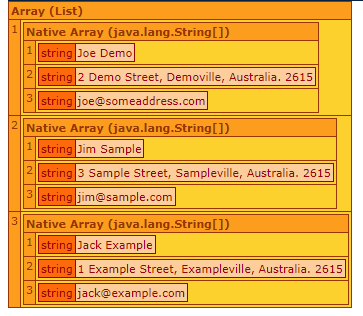
<cfscript>

    csvFile ="#expandPath('.')#/csv_data/addresses.csv";
    csvData = [];

    fileReader = createobject("java","java.io.FileReader").init(csvFile);

    writeDump(fileReader);

    csvReader = createObject("java","com.opencsv.CSVReader").init(fileReader);
    writeDump(csvReader);
    csvData = csvReader.readAll();
    writeDump(csvData);

    csvReader.close();

</cfscript>
<alias name="createColorMap" language="Lua" id="179"> <value>local mapcolors ={"aliceblue", "antiquewhite", "aqua", "aquamarine", "azure", "beige", "bisque", "black", "blanchedalmond", "blue", "blueviolet", "brown", "burlywood", "cadetblue", "chartreuse", "chocolate", "coral", "cornflowerblue", "cornsilk", "crimson", "cyan", "darkblue", "darkcyan", "darkgoldenrod", "darkgray", "darkgreen", "darkkhaki", "darkmagenta", "darkolivegreen", "darkorange", "darkorchid", "darkred", "darksalmon", "darkseagreen", "darkslateblue", "darkslategray", "darkturquoise", "darkviolet", "deeppink", "deepskyblue", "dimgray", "dodgerblue", "firebrick", "floralwhite", "forestgreen", "fuchsia", "gainsboro", "ghostwhite", "gold", "goldenrod", "gray", "green", "greenyellow", "honeydew", "hotpink", "indianred", "indigo", "ivory", "khaki", "lavender", "lavenderblush", "lawngreen", "lemonchiffon", "lightblue", "lightcoral", "lightcyan", "lightgoldenrodyellow", "lightgreen", "lightgrey", "lightpink", "lightsalmon", "lightseagreen", "lightskyblue", "lightslategray", "lightsteelblue", "lightyellow", "lime", "limegreen", "linen", "magenta", "maroon", "mediumaquamarine", "mediumblue", "mediumorchid", "mediumpurple", "mediumseagreen", "mediumslateblue", "mediumspringgreen", "mediumturquoise", "mediumvioletred", "midnightblue", "mintcream", "mistyrose", "moccasin", "navajowhite", "navy", "oldlace", "olive", "olivedrab", "orange", "orangered", "orchid", "palegoldenrod", "palegreen", "paleturquoise", "palevioletred", "papayawhip", "peachpuff", "peru", "pink", "plum", "powderblue", "purple", "red", "rosybrown", "royalblue", "saddlebrown", "salmon", "sandybrown", "seagreen", "seashell", "sienna", "silver", "skyblue", "slateblue", "slategray", "snow", "springgreen", "steelblue", "tan", "teal", "thistle", "tomato", "turquoise", "violet", "wheat", "white" , "whitesmoke", "yellow", "yellowgreen"} function tablelength(T) local count = 0 for _ in pairs(T) do count = count + 1 end return count end local maxcolumns = 10 local colorcount = tablelength(mapcolors) local mapdir local c local targetcolor = 0 local r = 0 local numrows = colorcount/maxcolumns + 1 for r = 1, numrows do if r % 2 == 0 then mapdir = "e" else mapdir = "w" end -- always drop down for each row targetcolor = targetcolor + 1 if targetcolor > colorcount then break; end zs.make("s",mapcolors[targetcolor]) zs.func.roomcol(null,mapcolors[targetcolor]) for c = 1,maxcolumns - 1 do targetcolor = targetcolor + 1 if targetcolor > colorcount then break; end zs.make(mapdir,mapcolors[targetcolor]) zs.func.roomcol(null,mapcolors[targetcolor]) end end </value> </alias>
If you use cmud client, the following will capture room descriptions to the map. It's not elegant code wise in that it requires a special color combination for room descriptions to enable the scripts to only see the room lines, build up the description and then update on the description termination Terrain.
Variables
flag to turn description capture on/off
#var roomdesc 1
holds the captured text of a description
#var description_store ""
a placeholder to capture result of function so as not to display on mud
#var result
Aliases
<alias name="roomson" id="136">
<value>#var roomdesc 1;#show you have turned on update room desc.</value>
</alias>
<alias name="roomsoff" id="137">
<value>#var roomdesc 0;#show you have turned off update room desc.</value>
</alias>
Triggers
Creates a trigger that matches any text that matches a foreground/background color. The description color has to be a unique combo. each line is captured and adds it to the description_store variable and then when the 2nd trigger "Terrain:" hits, it updates the map room description
<trigger priority="1310" regex="true" linecolor="112" id="131">
<pattern>(.*)</pattern>
<value>#var description_store %concat(@description_store,%1)</value>
</trigger>
<trigger priority="1330" id="133">
<pattern>Terrain:</pattern>
<value>
#if (@roomdesc == 1) {
#var foo %roomdesc(%roomvnum,@description_store);
}
#var description_store "";
</value>
</trigger>
I had over 10 years of photos that I wanted to organize by YYYY/MM. Created this Bash script to do it.
#!/bin/sh
#script:       archiver.sh
#
#

sourceDir="/f/from_kims_ext/"
#sourceDir="/f/test/"
archiveDir="/f/image_archive/"
ARCHIVEFILE="/f/move_archive.txt"

function getfilelist {
`ls -Rp $sourceDir | awk '
/:$/&&f{s=$0;f=0}
/:$/&&!f{sub(/:$/,"");s=$0;f=1;next}
NF&&f{ print s"/"$0 }' | sed "/\/$/d" > $ARCHIVEFILE`
}

function parsefilename {
  sourcefilename=`basename $1`
  extension="${sourcefilename##*.}"
  filename="${sourcefilename%.*}"
}

function updatefilename {
  typeset counter
  counter=0

  #check if ok to use original filename
  updatecheck="$archiveDir$datepath/$filename.$extension"
  echo "checking if target $updatecheck exists"
 # if [[ -f $updatecheck ]]; then
   if [ ! -f ${updatecheck} ]; then
    echo "$updatecheck does not exist"
    return
  else
    echo "$updatecheck exists"
  fi

  while [[ $counter -lt 200 ]]
  do
    counter=$((counter+1))
    updatecheckinc="$archiveDir$datepath/$filename"
    updatecheckinc+="_"
    updatecheckinc+="$counter.$extension"
    echo "checking for new $updatecheckinc"
    if [[ ! -f "${updatecheckinc}" ]]; then
      break
    fi
  done
 # changing name because it already exists, so increment to new file name
  filename+="_"
  filename+="$counter"
  echo "updating filename to $filename"
  return
}

set -u
#LOG_TIME=`date |cut -c12-13,15-16,21-23| sed s/" "//g`
LOG_TIME=`date`
 thisyear=`date +"%Y"`
 thismonth=`date +"%m"`

echo "archive starting..."
echo "Starting archive at $LOG_TIME"

getfilelist

# Setting delimiter to an empty string since we want to read the entire line of the file
# and be able to handle files with spaces since the default is a space delimiter
SAVEIFS=$IFS
IFS=$''

((archived_moved=0))
while read file
do
  parsefilename $file
  echo "processing $filename with extension $extension"
  fDate=`stat -c %y "${file}"`
  fDate=$(echo "$fDate" | cut -d' ' -f1)
  #example  2018-01-12
    year=$(echo ${fDate} | cut -d'-' -f1 )
    month=$(echo ${fDate} | cut -d'-' -f2)
    day=$(echo ${fDate} | cut -d'-' -f3)
    filedate=${year}${month}
   if [ $(echo "$filedate" | grep -c '^[0-9]\{6\}$') -eq 1 ]
    then
        if [ ! -d ${archiveDir}${year}/${month} ]
        then
          echo "echo making directory $archiveDir$year/$month"
          mkdir -p ${archiveDir}${year}/${month}
        fi
        datepath="${year}/${month}"
        updatefilename
        echo "Archiving ${file} to ${archiveDir}${datepath}/$filename.$extension"
        mv "${file}" "${archiveDir}${datepath}/${filename}.${extension}"
        ((archived_moved=archived_moved+1))

    else
        echo "Couldn't get stat on ${reportBakDir}${file}"
    fi
done <"$ARCHIVEFILE"
IFS=$SAVEIFS
#END_TIME=`date |cut -c12-13,15-16,21-23| /usr/bin/sed s/" "//g`
END_TIME=`date`
echo "Completed archive at $END_TIME"
exit 0
import re

print( re.sub(r'(foo)(bar)',r'\g<2>\g<1>','foobar'))
# coding=CP1252
import re

text = """
LADY CAPULET
    Alack the day. She’s dead, she’s dead, she’s dead!
CAPULET
    Ha! Let me see her. Out, alas! She’s cold.
    Her blood is settled, and her joints are stiff.
    Life and these lips have long been separated.
    Death lies on her like an untimely frost
    Upon the sweetest flower of all the field.
Nurse
    O lamentable day!
"""
| autorep -j YOUR_JOB_OR_BOX_NAME | sed -e 's/ \{2,\}/|/g'| sed -e 's/_\{2,\}/ /g' | sed 's/\(.*\)/|\1/g' | sed -e 's/\(Job Name\)/|\1/g' | sed -e 's/\(Last Start\)/|\1/g' | sed -e 's/\(Last End\)/|\1|/g'| sed -e 's/ST Run/ST||Run/g' | sed -e 's/Ntry Pri\/Xit/Ntry||Pri\/Xit||/g'| sed -e 's/\(.*\)\([0-9]\{8\}\/[0-9]*\)/\1|\2|/g' |


